Parcel

Share a file. Leave the rest to us.

Upload. Send the link.
Expiry takes care of cleanup.

MIT open source · Workers Free supported

Encrypted at both ends

End-to-end encryption: plaintext appears only in the sender’s and recipient’s browsers. Cloudflare receives, stores, and returns ciphertext. The plaintext file key is never uploaded.

Sender’s browser

Original file

Generates a random file key locally. Encrypts 16 MiB plaintext blocks with AES-256-GCM before uploading.

Upload ciphertext

Cloudflare

Ciphertext

Private R2 stores encrypted data; D1 stores the encrypted key envelope. The Worker checks permissions, expiry, and download limits, then signs short-lived download URLs.

No plaintext file key in the cloud

Download ciphertext

Recipient’s browser

Restored file

Uses the complete link and optional share password to open the key envelope locally. Verifies blocks, decrypts, saves, and checks the full SHA-256.

You deliver the decryption material

The complete link’s #k=…, plus your share password if set → the recipient’s browser. The fragment key is never sent with HTTP requests or added to the Parcel API.

Each file has an independent random 256-bit key. Every block has a fresh 12-byte nonce and a 16-byte authentication tag: 28 extra bytes. Authentication binds the file identity, block order, and length.

File contents, original filenames, media types, and the plaintext SHA-256 are encrypted. The server still sees file sizes, share IDs, expiry, download counts, and request metadata. This end-to-end encryption applies to the Cloudflare deployment; the separate Go and origin-backed Pages builds retain their earlier transfer protocol.

A link key, plus your password

  1. Keep the link complete

    A random 32-byte secret sits after # in the share link. URL fragments are not sent in HTTP requests. Parcel does not put this secret in its API calls. Without it, the recipient cannot unwrap the file key, and the server cannot recover it.

  2. Unwrap locally

    Without a password, HKDF derives the envelope key from the link secret. Password-protected shares add Argon2id with an independent random salt. HKDF combines the password material and link secret to wrap the file key and metadata using AES-GCM. The recipient needs the complete link and the password, if set.

  3. Gate downloads separately

    Another separately salted password credential goes to the Worker over HTTPS for online authorization. That credential is not the wrapping key. Expiry, limits, revocation, and admin TOTP remain server-side checks.

Changing a share password rewraps the small key envelope; it does not reupload the file. Anyone who already obtained the old file key and ciphertext can keep decrypting their copy. Revocation cannot retrieve saved files or keys.

This assumes a trustworthy browser, device, and delivered webpage. Maliciously changed webpage code, extensions, or local malware can access keys at an endpoint. HTTPS and Cloudflare’s storage encryption remain additional layers, rather than substitutes for endpoint trust.

Read the end-to-end encryption protocol · Read the implementation

Start from scratch

The deploy button creates the app resources. Follow the dashboard screens below to set up administrator access and browser uploads. Screenshots reviewed .

Prepare your accounts

Prepare GitHub and Cloudflare accounts. Enable R2 and a Workers subdomain. Existing accounts do not need to repeat setup. R2 may require a payment method; complete plan and payment setup yourself.

This guide is for new instances. To upgrade an existing Go, Pages, or earlier Worker instance, use the repository’s migration and production deployment docs so that two services do not manage the same bucket.

The app defaults to a 9 GB storage quota and an 8 GiB file limit. R2 free allowances are shared across your account; storage, requests, and other buckets affect billing. The app quota is not a billing cap. See R2 pricing.

Create the app

Click the deploy button and follow Cloudflare’s steps to create your own GitHub repository and choose a Worker, D1 database, and R2 bucket. Keep the root directory at / and use Node 24.

Use npm run build as the build command and npm run deploy as the deploy command. The deploy script applies D1 migrations through the DB binding and writes the actual bucket name to R2_BUCKET_NAME.

Disable preview builds. The template and deployment commands set ADMIN_AUTH=totp; omitting this runtime variable also defaults to password + TOTP. Administrators sign in with a password and authenticator code; public share pages remain available to recipients.

Keep ACTIVE=false for the first deployment. A serverless_unconfigured response is expected until runtime configuration is complete. Do not share links before setup is finished.

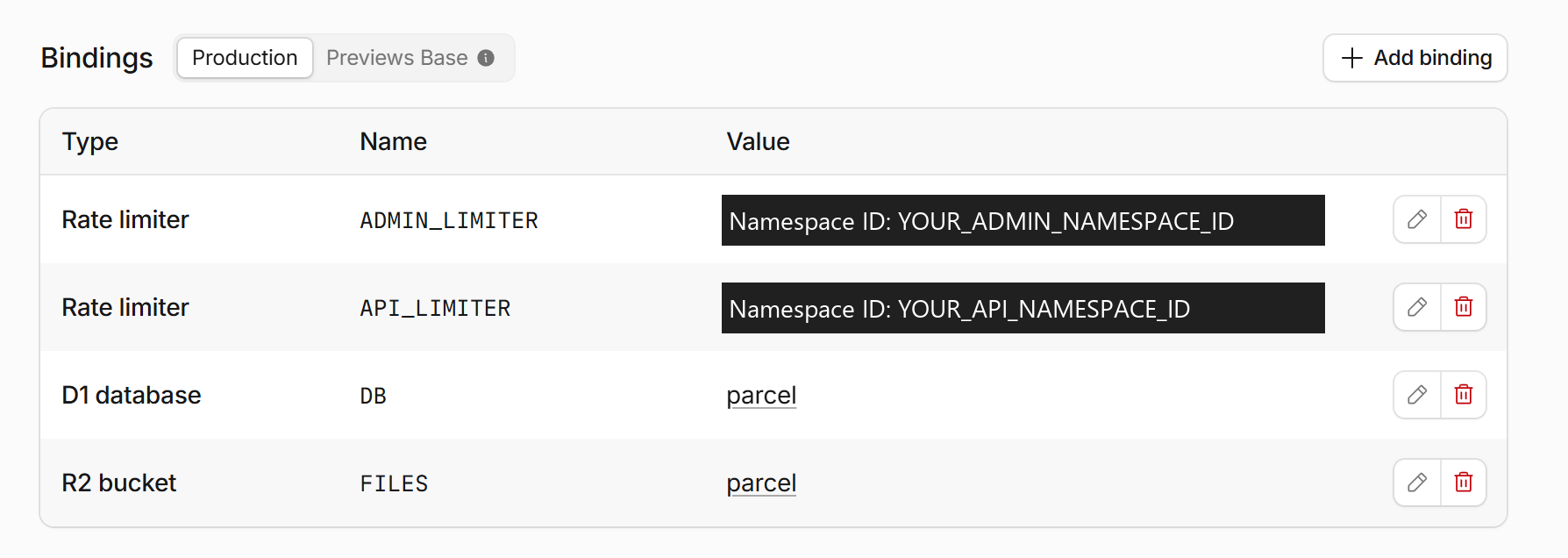
Production D1, R2, and two rate limiter bindings with example namespace labels
Settings → Bindings → Production: DB binds D1 and FILES binds private R2. ADMIN_LIMITER and API_LIMITER are rate limiters. This instance names its resources parcel. Namespace values are replaced with YOUR_*_NAMESPACE_ID labels; keep the bindings generated by your own deployment.
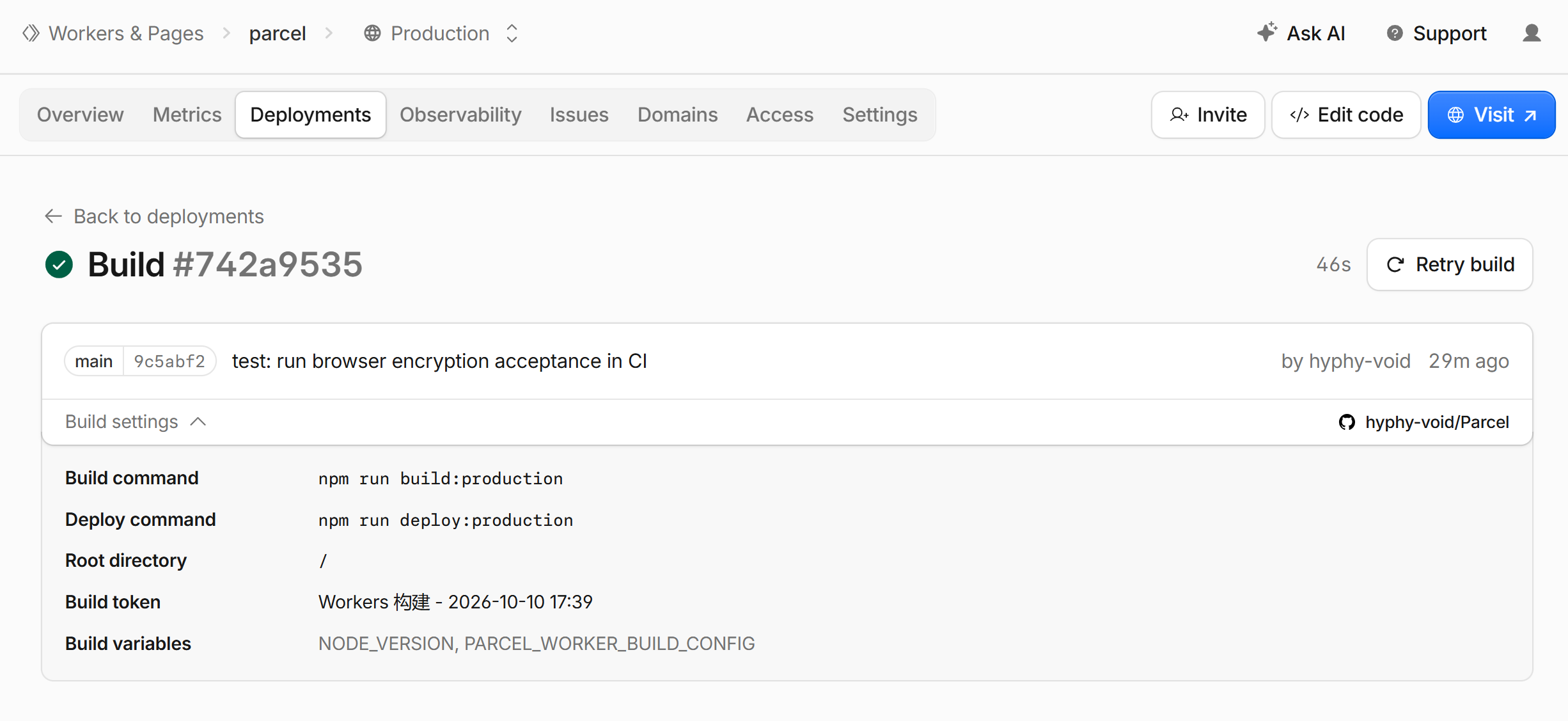
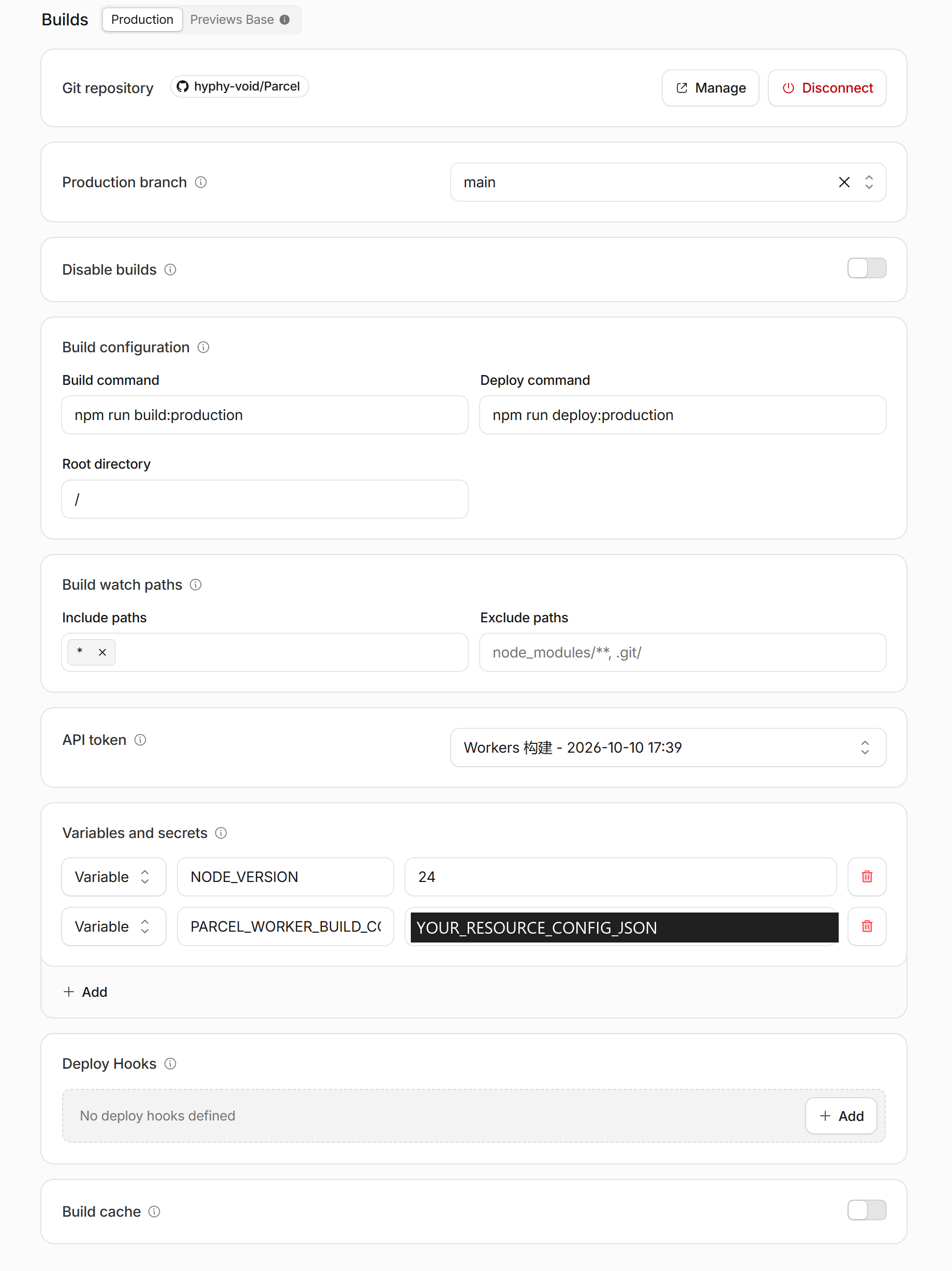
Successful production parcel build for commit 9c5abf2 with expanded production build settings
A successful build of the existing production parcel instance. Build settings shows npm run build:production, npm run deploy:production, and root directory /. The green check marks a successful build of commit 9c5abf2. This illustrates a production update. New button deployments must use npm run build and npm run deploy, without :production.

Password + TOTP login

Administrators sign in with a Parcel password and TOTP code. The template and deployment commands set ADMIN_AUTH=totp; omitting this runtime variable also defaults to this login mode. Complete the first-time enrollment below.

Parcel binding page

Binding code generated locally
Scan or import manually

Your authenticator

A new code every 30 seconds

Save recovery codes

Keep 8 codes separately · Rebinding invalidates old codes
Process diagram only: no scannable QR code, real secret, or valid recovery code.
  1. Complete the R2, variable, and three permanent secret settings below first. Keep ACTIVE=false. Deployment applies D1 migrations, including 0003_admin_totp.sql.
  2. Clone the repository locally and use Node 24. Run npm run admin:setup-token. It saves a random initialization secret in .parcel-v3/admin-setup-token.txt without printing it or overwriting an existing file. Store its contents as Worker Secret ADMIN_SETUP_TOKEN, without the final newline. Preserve the existing SESSION_SECRET.
  3. Open your /login, enter the initialization secret, and set an admin password of at least 12 characters. Scan the binding code with a TOTP authenticator or import the secret manually. Enter its 6-digit code to confirm. The QR code is generated locally in the browser, without a third-party QR service.
  4. Save the 8 recovery codes securely, then remove ADMIN_SETUP_TOKEN from Worker Secrets. Normal login uses a password and TOTP code. Login security lets you replace the authenticator; if it is lost, a password plus one recovery code starts rebinding. Each recovery code works once.

After enrollment, use a new private window to verify password + TOTP login, rejection of incorrect credentials, and HTTP 401 from anonymous administrator APIs. Then set ACTIVE=true and deploy before testing uploads and public shares. Maintenance allows enrollment and login, but file transfers remain disabled.

Create R2 credentials

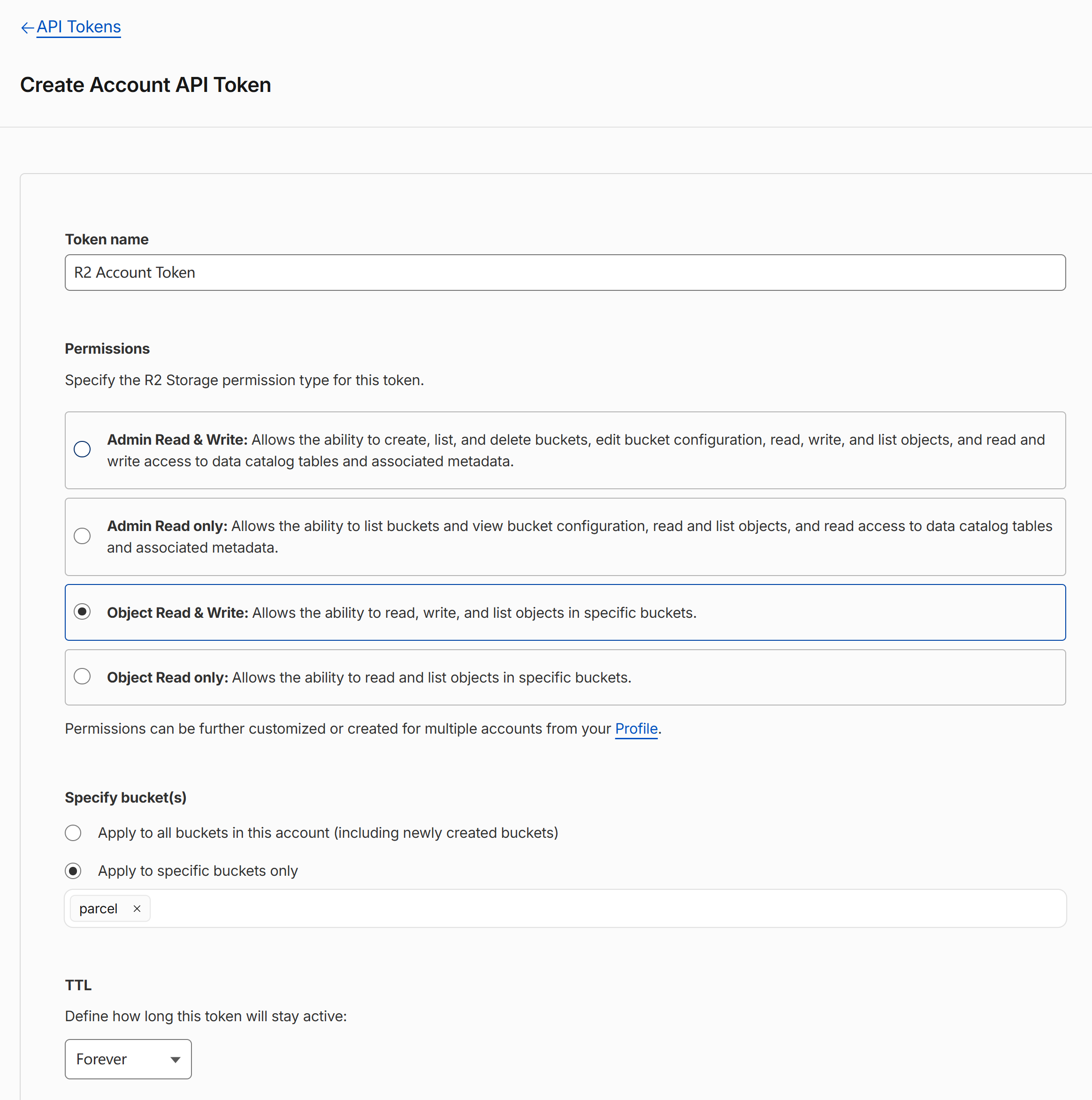
Go to R2 → Overview → Manage API Tokens → Create Account API token. Choose Object Read & Write and restrict access to this app’s bucket. Save the S3 Access Key ID and Secret Access Key as two Worker secrets.

R2 account token form with Object Read & Write and only the parcel bucket selected
Create Account API Token: select Object Read & Write, then Apply to specific buckets only and choose the parcel bucket. This is the setup form; no Access Key ID or Secret Access Key has been generated or shown.

R2_ENDPOINT is the account-level S3 API address in the bucket settings, such as https://ACCOUNT_ID.r2.cloudflarestorage.com, without a bucket name or trailing slash. The Worker’s FILES binding, R2_BUCKET_NAME, and credential scope must refer to the same bucket.

Keep the bucket private. Do not enable a public r2.dev URL or public bucket domain. Uploads and downloads use short-lived presigned URLs.

Save variables & secrets

Open Worker → Settings → Runtime variables and secrets. Save ordinary settings as variables. Check “Secret” for these three values:

  • SESSION_SECRET: an independently generated random value of 64 hexadecimal characters.
  • R2_ACCESS_KEY_ID: the S3 Access Key ID you just created.
  • R2_SECRET_ACCESS_KEY: its matching S3 Secret Access Key.
Generate a session secret
node -e "console.log(require('node:crypto').randomBytes(32).toString('hex'))"

Generate the session secret in your own terminal. Keep it out of Git, issues, screenshots, and webpages. Back it up securely and preserve it on later deployments. Replacing it prevents decryption of password verification material and TOTP secrets, affecting share unlock and administrator login.

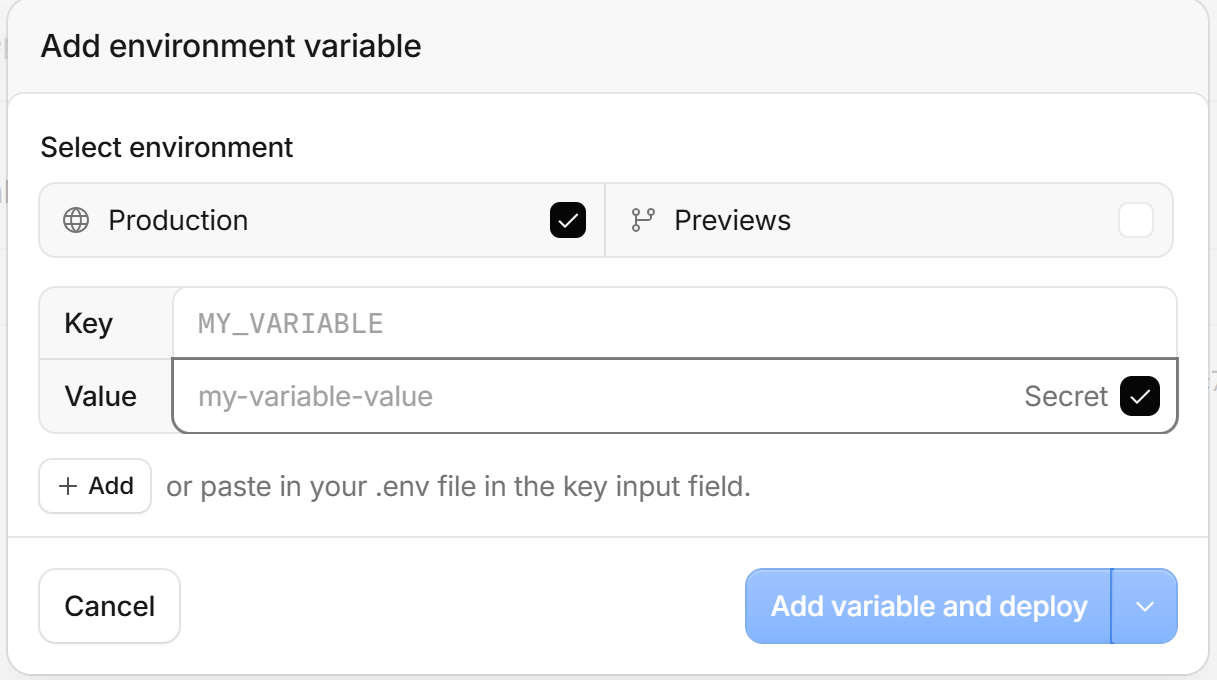
Empty Add environment variable form with Production and Secret selected
Add variable: choose Production, enter the Key and Value, and check Secret. The inputs here are empty and show placeholders only. Never include actual secrets in screenshots.

At minimum, set PUBLIC_URL, ADMIN_AUTH=totp, R2_ENDPOINT, and R2_BUCKET_NAME. PUBLIC_URL must match your actual HTTPS origin, with no path or trailing slash. First-time enrollment also needs the temporary ADMIN_SETUP_TOKEN secret; remove it after binding.

Allow browser uploads

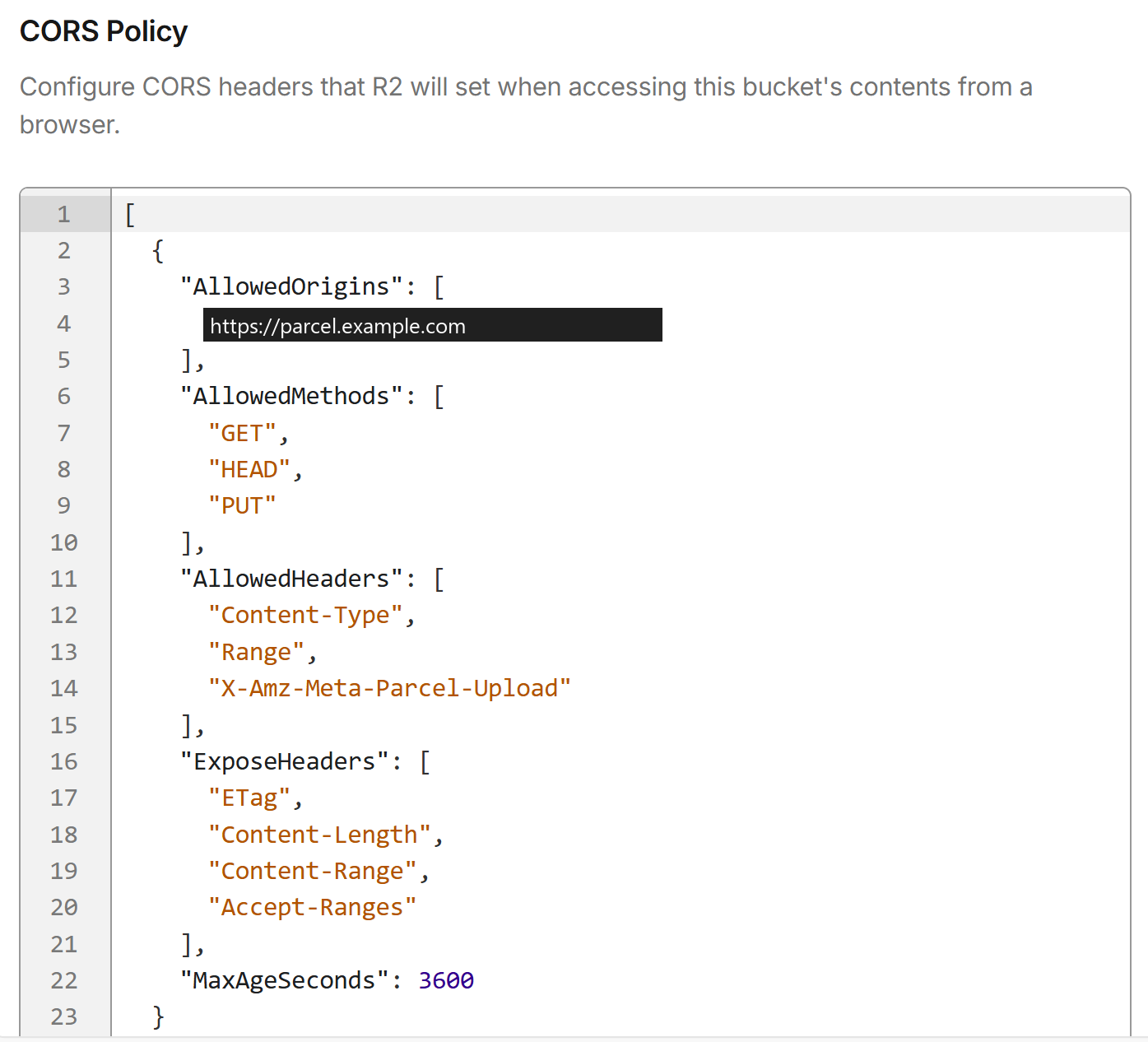
Open R2 → your bucket → Settings → CORS Policy → Edit. AllowedOrigins must exactly match PUBLIC_URL. The configuration tool below generates the JSON to paste.

Private R2 bucket CORS Policy editor with an example origin replacing the real domain
Settings → CORS Policy → Edit. Use the same origin as PUBLIC_URL. Include Content-Type, Range, and X-Amz-Meta-Parcel-Upload; the generator and no-JavaScript example below include all three. CORS controls which cross-origin requests browsers can send. File access still requires a private bucket and signed authorization.

Under Object lifecycle rules, add a rule to abort incomplete Multipart uploads after one day, scoped to the parcel/v3/ prefix. Do not add a separate age-based deletion rule for completed objects: the app’s Cron and D1 state coordinate expiration and deletion.

Check that Cron is */5 * * * *. On Free, keep WORKERS_PLAN=free and CLEANUP_BATCH_SIZE=1.

Use encrypted shares

Choose a file and optional share password. The browser first hashes the whole original file, then encrypts and uploads one 16 MiB plaintext block at a time. Memory use stays bounded; the final block may be smaller. Empty files have one authenticated 28-byte encrypted block.

Pause or refresh without clearing site data. Select the original file again to resume: Parcel checks its entire SHA-256, rather than trusting its name or size. Completed blocks stay in R2; retries use fresh nonces. The browser must retain its local upload key and the task must remain valid.

Copy the complete share link, including #k=…, and send the optional password separately. Keep a copy of the link. On the share page, use “Back up / import local share keys” to export a small encrypted key backup with a separate passphrase of at least 12 bytes. Import it before managing passwords on another browser. An administrator session alone cannot recover missing keys or filenames.

The recipient unlocks the file locally and downloads authenticated ciphertext blocks into this browser’s IndexedDB. After reception, “Save decrypted file” verifies, decrypts, and streams the original file to disk; it never builds one whole-file Blob. Refreshing can resume from complete cached blocks. Repeated requests in the same valid download session do not consume another download qualification.

Allow space for both the temporary ciphertext and final file, roughly twice the file size plus headroom. Browser storage quotas, private mode, device free space, download permissions, and storage eviction can limit large files. Long-term storage permission is optional and does not block reception. Keep the page open while saving; clear its local resume cache after confirming the file is saved.

Keys in the creating browser’s site data are not protected against someone who controls that browser. Back them up before clearing site data or changing devices. Losing all local keys, complete links, and backups is unrecoverable by the server. Earlier unencrypted Worker shares are not compatible and must be uploaded again; the upgrade does not delete existing D1 or R2 data. Go and origin-backed Pages remain separate, non-E2EE modes.
Generate your config

Enter your app URL, account ID, and bucket name. Everything is computed in this browser. The tool never asks for secrets.

Everything stays in this page. Reload to clear it.

Check before launch

Set ACTIVE to true and deploy. Test the whole flow with a small file before opening your instance.

  1. Open /admin in a private window. It must show password and authenticator-code login. Incorrect passwords or codes must fail, and anonymous administrator APIs must return HTTP 401.
  2. Upload empty, small, and multi-block files, with and without a password. Pause, refresh, and select the original file to resume. Check that R2 contains ciphertext and D1 has no original filename or plaintext file key.
  3. Open complete links while signed out. Test correct and incorrect passwords and missing fragment keys. Pause and refresh reception, save the decrypted file, and compare its SHA-256 with the original. A lost initial response or retry in the same valid session must not consume another download.
  4. Revoke a share and check that it cannot issue new signed URLs. Previously signed URLs can remain valid for up to five minutes. Copies of ciphertext and keys already obtained cannot be recalled.
  5. Export and import an encrypted key backup. Change the share password without uploading the file again; confirm that a fresh recipient needs the new password and complete link.
  6. Wait for Cron. Confirm that quota is released after object deletion, and inspect Worker errors and CPU metrics.

Workers Free has a CPU budget of 10 ms per request. Local tests do not verify production CPU or real R2 settings. Check metrics if production returns error 1102. See Workers limits.

Need a hand?

The page returns serverless_unconfigured

Check ADMIN_AUTH=totp and the three permanent secrets. SESSION_SECRET must contain 64 hexadecimal characters. PUBLIC_URL and R2_ENDPOINT must be HTTPS origins without a path or trailing slash. An uninitialized instance also needs ADMIN_SETUP_TOKEN.

host_denied or a login loop

The hostname you visit must match PUBLIC_URL, and the browser must allow session cookies. If authenticator codes fail, enable automatic time synchronization on the authenticator device; each 30-second time step can be used only once. After a login timeout, the page checks for an established session and offers entry to the admin page or a new login. An app domain change needs updated PUBLIC_URL and R2 CORS; moving this guide does not change the app domain.

CORS rejection or a signature error

Check that the CORS origin exactly matches PUBLIC_URL and that the FILES binding, R2_BUCKET_NAME, and S3 credential scope use the same bucket. An API token cannot replace the S3 Secret Access Key.

Which screenshots need updating?

Update any Parcel app screenshots of upload creation and progress, complete share links, password changes and key backups, and the recipient’s unlock, ciphertext reception, and decrypted-save flow. Use disposable demo files and keys, and never publish a real full link, password, key backup, or authenticator secret.

The guide keeps six Cloudflare configuration screenshots: bindings, successful build details, R2 credentials, adding secrets, CORS, and production build settings. Generate runtime variables with the config tool. End-to-end encryption adds no server-side file key or CORS header. TOTP enrollment remains a webpage illustration; no real binding screenshot is needed.

How do updates preserve my config?

Template deployment uses --keep-vars to preserve dashboard variables and secrets, and applies D1 migrations first. Do not switch a production instance to first-time CLI bootstrap. Back up D1 and SESSION_SECRET and read migration notes before upgrading. Rolling back a Worker does not roll back its database.

Production main branch build configuration with a placeholder replacing the resource configuration
Settings → Builds → Production: this existing instance uses npm run build:production and npm run deploy:production, root directory /, and Node 24. The solid YOUR_RESOURCE_CONFIG_JSON label replaces the entire original build-variable value. It is a placeholder, not literal JSON: supply the complete object with accountId, workerName, databaseId, databaseName, and bucketName as documented in the operations guide. New button deployments still use npm run build and npm run deploy.
Can I use only the CLI?

Yes. Install Node 24 and Bash, clone the repository, and use deploy/v3.example.json to create a config in an ignored directory. Prepare an account-scoped management token and a private ADMIN_SETUP_TOKEN, then run npm run deploy:bootstrap -- --config .parcel-v3/deploy.json. Set your password and bind TOTP at /login, save recovery codes and remove the setup secret, then rerun with --activate. The script verifies enrollment before opening the service. See the repository docs for credentials, migration, and recovery.